useSend – Open source email platform
Pay only for what you send, not for storing contacts
What it is
useSend is an open-source email platform designed for sending product, transactional, and marketing emails. It is targeted at developers, builders, and open-source teams who seek a transparent, cost-effective, and self-hostable alternative to traditional email services. The platform operates on a pay-per-send pricing model, where users are charged only for emails sent, not for storing contacts.
Main Features
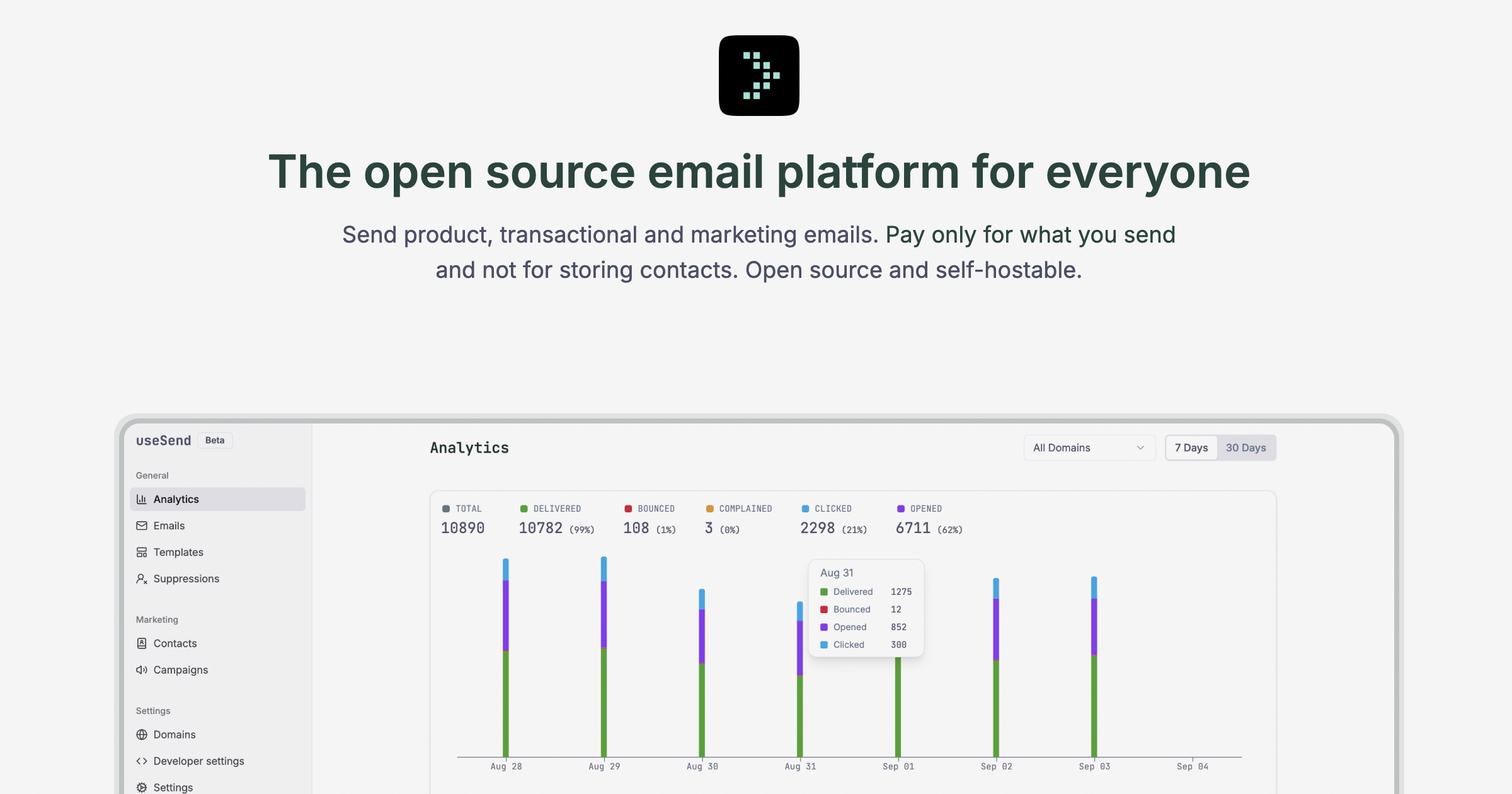
Email Management & Analytics
- Analytics Dashboard: Track deliveries, opens, clicks, bounces, and unsubscribes in real time.
- Searchable Log: Filter email logs by domain, status, or API key and export the data.
- Campaign Performance: Monitor which marketing campaigns perform best.
Marketing Tools
- Visual Email Editor: A WYSIWYG (What You See Is What You Get), Notion-like editor for designing marketing campaigns without code.
- Template & Branding: Reuse templates and maintain consistent brand styles.
- Personalization: Personalize emails using variables.
Contact & Compliance
- Contact Management: Manage contacts, lists, and consent in a centralized system with easy import/export functionality.
- Automatic Updates: Contact subscription status is automatically updated based on bounces and complaints.
- Suppression List: Automatically populated from bounces and complaints to prevent accidental sends; manageable via import/export or API.
Developer & Infrastructure
- SMTP Relay: A drop-in SMTP relay compatible with any application or framework (e.g., Supabase) to avoid vendor lock-in.
- Typed SDKs: Officially supported SDKs for TypeScript, Python, Go, and PHP.
- Simple REST API: Direct API access for sending emails and managing platform features.
How it works
Sending Transactional Emails
Developers integrate useSend into their applications using its SDKs or REST API. They authenticate with an API key and call the send function, providing recipient, sender, subject, and content (HTML/text) to deliver automated emails like welcome messages or password resets.
Creating & Sending Marketing Campaigns
Users design marketing emails using the visual drag-and-drop editor, applying brand styles and personalization variables. They then select target contact lists, schedule or send the campaign, and monitor its performance through the analytics dashboard.
Self-Hosting the Platform
Teams can deploy the open-source software on their own infrastructure. This involves cloning the repository from GitHub, configuring the environment (typically to use Amazon SES for sending), and hosting it, allowing for full data control and customization.
Key Points
- Open Source: The core software is publicly available on GitHub, enabling transparency, community contributions, and self-hosting.
- Cost Structure: Pricing is based solely on the volume of emails sent, with no charges for contact storage.
- Avoids Vendor Lock-in: The SMTP relay and simple API allow easy integration and migration.
- Developer-Focused: Offers typed SDKs and clear documentation to simplify integration.
- Underlying Infrastructure: Utilizes Amazon SES for reliable email delivery, providing a managed interface and dashboard on top of it.
Additional Details
Pricing
- Free Tier: $0/month. Includes 3,000 emails per month (max 100/day), 1 contact book, 1 domain, and 1 team member.
- Paid Tier: $10 minimum monthly usage. Credits are applied at rates of $0.0004 per transactional email and $0.001 per marketing email. Includes unlimited contact books, domains, and team members.
Availability
- Available as a cloud-hosted service via the useSend website.
- The source code is available for self-hosting via its GitHub repository.
Requirements
- To send emails, users must verify and configure sending domains within the platform.
- Self-hosting requires appropriate server infrastructure and configuration to connect to an email sending service like Amazon SES.