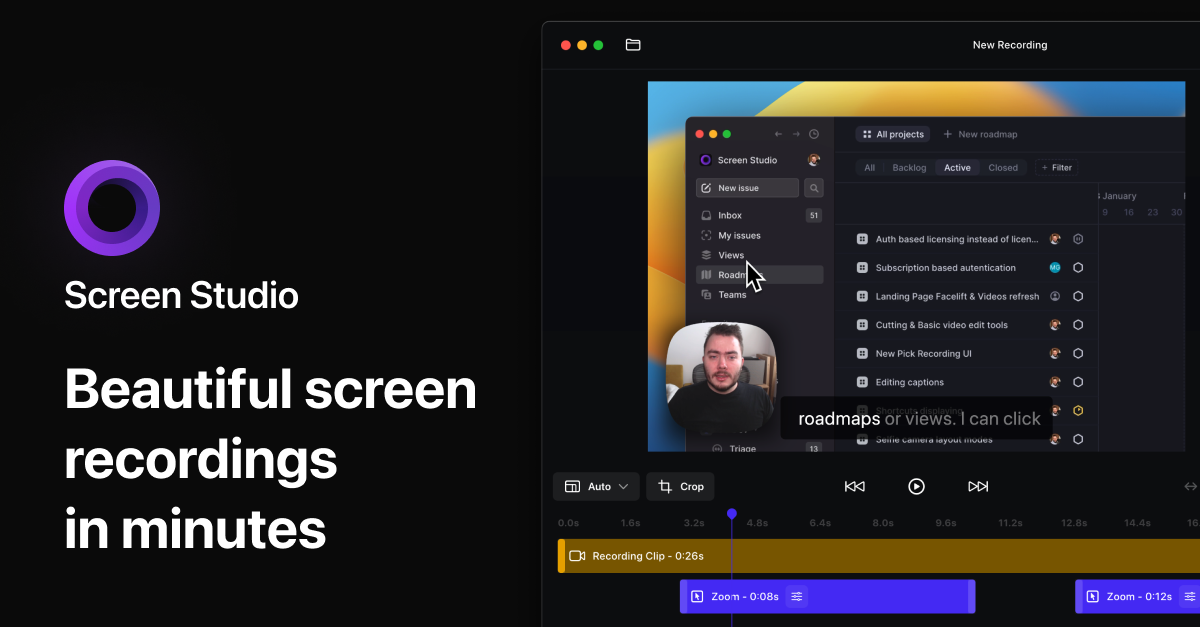
Screen Studio — Professional screen recorder for macOS
Screen recorder for macOS. Create engaging product demos, courses, tutorial and social media videos. Add automatic zoom on mouse actions, smooth mouse movement, and other powerful effects and animations. Designed for macOS.
#1 Product of the Year — Product Hunt Beautiful Screen Recordings in Minutes macOS screen recorder with automatic zoom and smooth animations for product demos, tutorials, and social media videos. play_arrow pause Helping people create beautiful screen recordings at Made with Screen Studio Thousands of people use Screen Studio to record product demos, courses, tutorials, and social media posts.
Engaging screen recordings.
Created in minutes.
Screen Studio is an opinionated screen recorder that makes your videos look beautiful.
It automatically zooms in on your cursor, increases the cursor size and smooths its movements.
Automatic zoom for engaging screen recordings Make your demos and tutorials easier to follow while grabbing more attention. Especially on smaller screens. Automatic zoom
To focus on the main action, Screen Studio automatically zooms in on actions you perform on your screen.
Export in vertical mode
If you need to export your video for social media, Screen Studio will automatically adjust all the zooms for an optimal viewing experience.
Manual zoom
You can also manually select important parts of your recording. Screen Studio will automatically animate all the zooms.
Easy editing
Simply drag your zooms on the timeline. All the heavy lifting is done automatically. No manual work is required.
Professional animations by default Screen Studio is a video editor that works automatically. Effects that would take hours of manual work are created instantly. Smooth cursor movement
Shaky and rapid movement of your cursor is transformed into a smooth and beautiful glide.
Change cursor size after recording
Make your video easier to follow by changing the size of the cursor even after you have finished recording.
Automatically hide static cursor
If the cursor doesn't add value to your video, it can be automatically hidden in the final video with beautiful animation.
Loop cursor position
To make social media or demo videos loopable, the cursor can return to its initial position near the end of the final video.
High-quality system cursors
Screen Studio replaces known system cursors with their high-resolution versions if you increase cursor size.
Add your style and branding Whatever you record, it will match your brand. Change the background, outer spacing, shadow, inset, and more. Background and spacing
Easily change the background or spacing around your video.
Horizontal and vertical output
With one click, change the desired output of your video. All animations will be automatically adjusted.
Shadow and inset
To adjust subtle details, change the shadow or inset of your video.
Cut & Speed up
Easily trim, cut, or speed up parts of your recording.
Easy screen recording
Simple, but powerful. Screen Studio can record webcam, microphone, system audio, or any iOS device.
Record webcam, microphone, and system audio Screen Studio makes it easy to create full-featured courses, tutorials, team updates, and demos. Record and adjust your webcam
Your selfie overlays the video and slightly zooms out to avoid covering your mouse cursor.
Enhance audio quality
Voice volume is normalized, and background noise is removed automatically.
Generate transcript
Generate a transcript of your video and add it as subtitles. All of this happens on your machine, and no data is sent to our servers.
Record system audio
Record system audio from all your apps or just selected ones. Creating audio tutorials just got a lot easier.
Record iPhone or iPad on your Mac Connect your device with a USB cable and start recording. Add zooms and create mobile app demos with no effort. play_arrow pause iPhone and iPad model detection
Screen Studio automatically detects the model and color of your device.
play_arrow pause Customize device frame and color
Screen Studio has a wide range of device frames and colors to choose from.
Easy iOS device recording
Connect your iPhone or iPad with a USB cable and start recording.
Export & Share. Smooth and easy. Optimal exports settings baked in. Decide where to publish your video, and Screen Studio will adjust all technical settings for you. Shareable links
Quickly share your video with anyone by generating a link.
Export presets
Export for the web, social media, or further editing in another video editor. Optimal settings are automatically selected.
Video and GIF exports
Export your videos in up to 4K 60fps or highly optimized GIFs.
Copy to clipboard
Copy your video to the clipboard and paste it into any other app for quick sharing. You can paste it on social media or in a chat.
There is more Screen Studio is packed with useful features while we try to make it easy to use and beautiful. play_arrow pause Motion blur
Movement in your videos will look more natural. The resulting videos resemble a professional video editor's output.
play_arrow pause Shareable presets
Save your video settings as a preset and share them with your friends or colleagues to make all your videos look consistent.
play_arrow pause Record and show keyboard shortcuts
If you're recording a tutorial, Screen Studio can record your keyboard shortcuts and display them in your video.
Crop your recording
Focus on a specific part of your screen or hide parts of the UI.
Hide desktop icons
Avoid distractions or hide your files from your viewers.
Designed for macOS Built and designed to be fast, reliable, and easy to use. Meet Screen Studio users Screen Studio empowers thousands of people to record beautiful videos and demos of their products and services. Brendan O’Leary @olearycrew Screen studio from @pie6k I think is the best tool I've picked up for my Mac in YEARS
screen.studio Abhishek Vijayvergiya @abvijayvergiya I'm seeing more and more product videos (even by Fortune 500) now being created in @screenstudio.
Being a user myself, and with 5+ years of content marketing background, this is definitely one of the best screen-recording apps that I have used. Great work @pie6k Sukh @thisissukh_ Never bought something so fast - screen.studio screen recordings look amaazing! 🌟✨ Stephan Meijer @meijer_s OMG. @screenstudio is 🤯. Took me ~ 5 minutes to create a nice looking video that I could share with my coworkers, to demo our new theme editor for the @magicbell_io push-subscription dialog. Vahe Hovhannisyan @vhpoet I can't put into words how much I adore @screenstudio! Using it for the first time today, and it's unbelievably amazing. Thank you @pie6k! See more One tool for your video-making needs Level up your tutorials, product demos, and collaboration with Screen Studio. Monthly Screen Studio
All Screen Studio features included.
$ 2 9 ∕ month Per month billed monthly. Switch to yearly anytime. Get Started check All Screen Studio features check Shareable links Yearly Screen Studio
All Screen Studio features included.
$ 9 ∕ month Per month billed yearly. Get Started check All Screen Studio features check Shareable links Questions & Answers If you have any other questions, please get in touch How is Screen Studio different from other screen recording apps? chevron_right Is the Windows version ready? chevron_right Is Screen Studio privacy-focused? chevron_right Is there an education discount? chevron_right What features will be added in the future? chevron_right What macOS version is required? chevron_right Where can I manage my subscription? chevron_right What happens if I purchased a one-time license in the past? chevron_right © 2026 Adam Pietrasiak. All rights reserved. Download Download for macOS Screen Studio Beta Create Videos Record engaging courses Screen recorder with audio Screen recorder with keyboard shortcut Create Product Demo Videos Loom vs Screen Studio Create Instagram Tutorials Product Changelog Roadmap Help Screen Studio Guide Educational Discount Contact Telegram group Feature requests hub Contact at team@screen.studio Manage Manage your account I forgot my license key Manage subscription Screen Studio We're hiring! Privacy Policy Terms of Service Affiliate links Brand Materials Follow me on Twitter Home Product chevron_right Help chevron_right Account Pricing We're hiring! chevron_left This website uses cookies, local storage and pixel tags for performance, personalization, and marketing purposes. We use our own cookies and some from third parties. Only essential cookies are turned on by default. Learn more Allow all cookies Allow only essential cookies

.webp)